

![[FBM] CARDS](https://cpa.rip/wp-content/uploads/cr-a1/fbm-cards-v1/fbm-cards-logo.svg)




In the OnlyFans industry, Facebook traffic has traditionally been considered difficult, and many people don’t understand how to work with it: media buyers often burn through their budgets and can’t find a profitable funnel that can be scaled. Despite this, Facebook is a goldmine of traffic, home to a targeted and high-paying audience of baby boomers who are ready to spend money on models.
In this case study, we’ll explain how we set up and launched Facebook Reels using an AI, show the results of our tests, and talk about the challenges you might run into. You’ll also learn how to avoid our mistakes — if someone had told us about this beforehand, we wouldn’t have burned $300 for nothing.
Getting Ready to Launch: Where to Get Ad Creatives, How to Choose an OnlyFans Model, and Whether You Need a Pixel
Right now, Reels is one of Meta’s best ad tools: ad creatives in short video format are shown to users browsing the Reels feed. Traffic from there has converted well on OnlyFans for several years now, but we decided to try the paid promotion format through the Facebook Ads account. We were also curious whether we could automate the whole process using Claude Code, and see how realistic it would be to scale the funnel.
Choosing an OnlyFans Offer and Preparing Ad Creatives
Before launching an ad campaign, you need to find suitable content and a model to send traffic to: your earnings and conversion rate depend directly on this. The most convenient way to do this is through the OnlyFans affiliate network OnlyTraffic, where you can select a suitable offer, view content samples, and track ad statistics and revenue in real time.
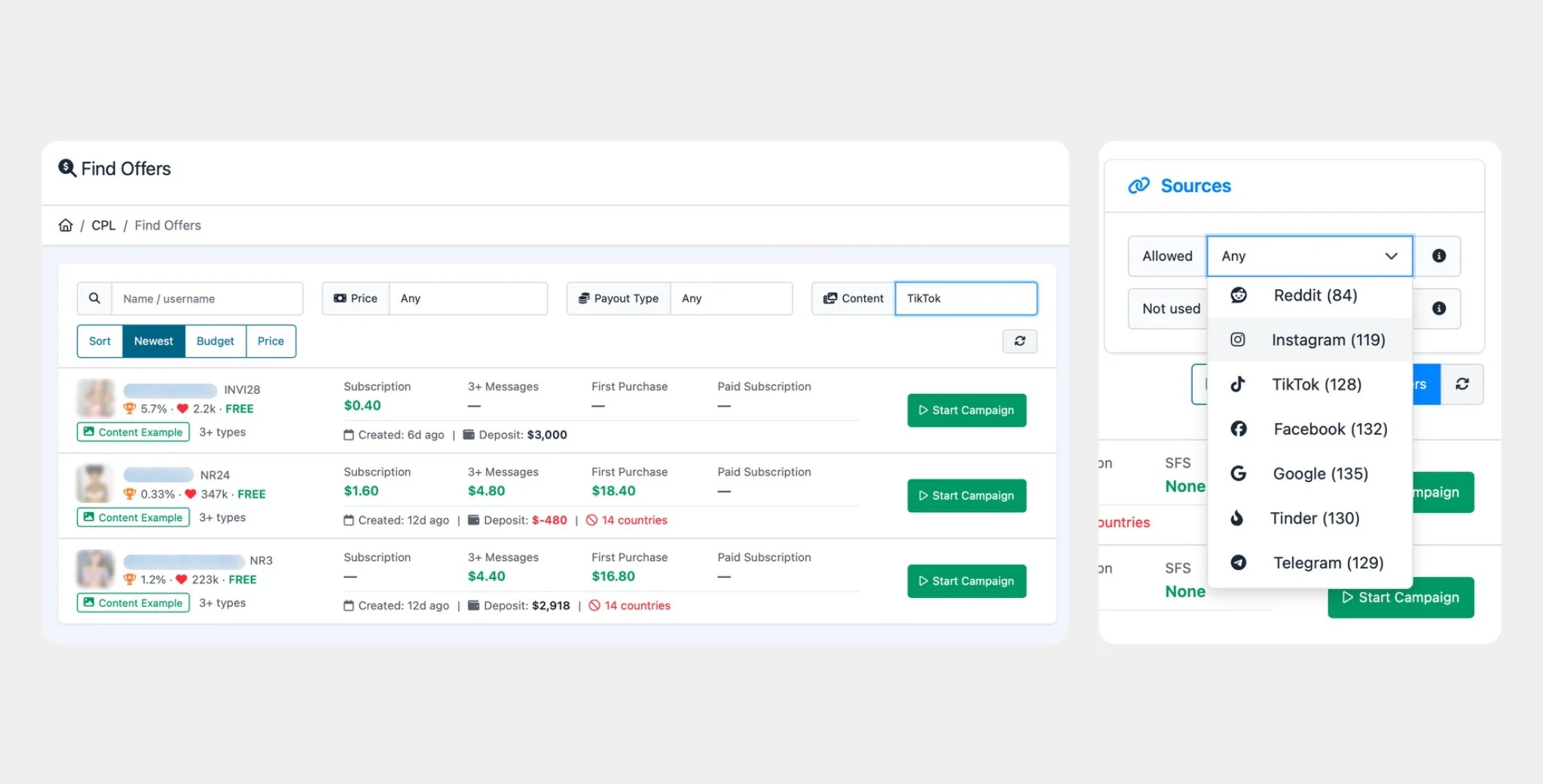
After connecting to the offer, you get access to a content library that already has ready-made Reels and TikTok-format videos: you can just grab them and upload them.
We picked one of the models on OnlyTraffic with a free subscription to her page — that means revenue comes in when a fan buys paid PPV content or sends tips. She already had a benchmark calculated based on stats, and the cost per subscriber shouldn’t exceed $1.71: if the ad brings in a fan for less than that, the funnel is profitable. It’s crucial to know this figure before you start, rather than finding out with your own money.
When choosing ad creatives, it’s important to remember that you can’t mention OnlyFans in Facebook ads — doing so will get your account banned. So the videos are always neutral, but with hints.
How to Track Results: What’s the Problem with the “Pixel,” and Why You Need Lifetime Attribution
When working with Facebook, many media buyers use the “Pixel” — a snippet of code on a web page that tells Facebook what a person did there: opened it, clicked a button. Facebook uses these signals to learn and find similar people. And here’s a dangerous point where you can lose money: most marketers place the “Pixel” on pre-landers like GetMySocial to optimize the ad campaign, but instead end up burning through their budget.
This happens because the “Pixel’s” main task becomes finding people who click on ads frequently, and then buying them at the most expensive prices. If you completely disable the “Pixel,” on the other hand, you can reach a broad audience and turn a profit — we’ll go into more detail on this below. The best option is setting up the Conversion API, but we’ll cover working with it in a separate article.
Initially, our “Pixel” was also placed on an intermediate page and only saw two events: “user opened the page” and “user clicked the button.”
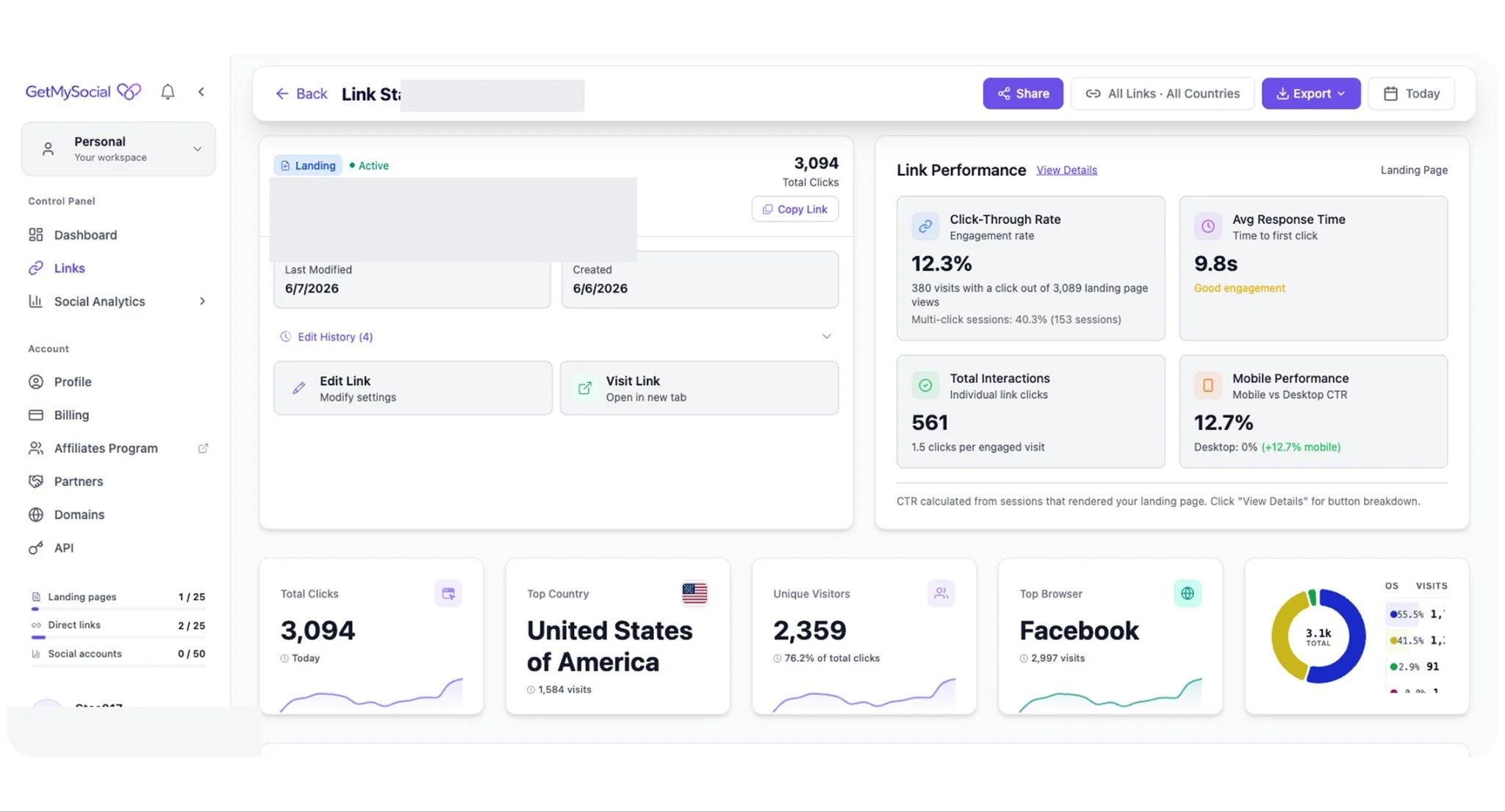
Subscriptions and purchases happen on OnlyFans, which the pixel can’t reach: it was counting clicks, not revenue. At that point, we had no server-side purchase reporting to Facebook at all.
So for real tracking of the ad campaign, we used a tracking link with a special tag. When a user clicks it and subscribes, OnlyFans attributes them to that specific ad: everything they spend in the future will be credited to that specific media buyer permanently. This is called lifetime attribution: revenue from a fan is tied to the source forever. Remember this mechanism — it’s the main character of this story. Only the tracking link, and nothing else, counted the real money.
Setting Up the Facebook Ads Account with Claude Code: A Walkthrough
Our main idea was to see whether we could fully automate the funnel, and later scale the whole process without it becoming unprofitable. The starting conditions were less than ideal: we used completely empty rented accounts, in someone else’s Business Manager.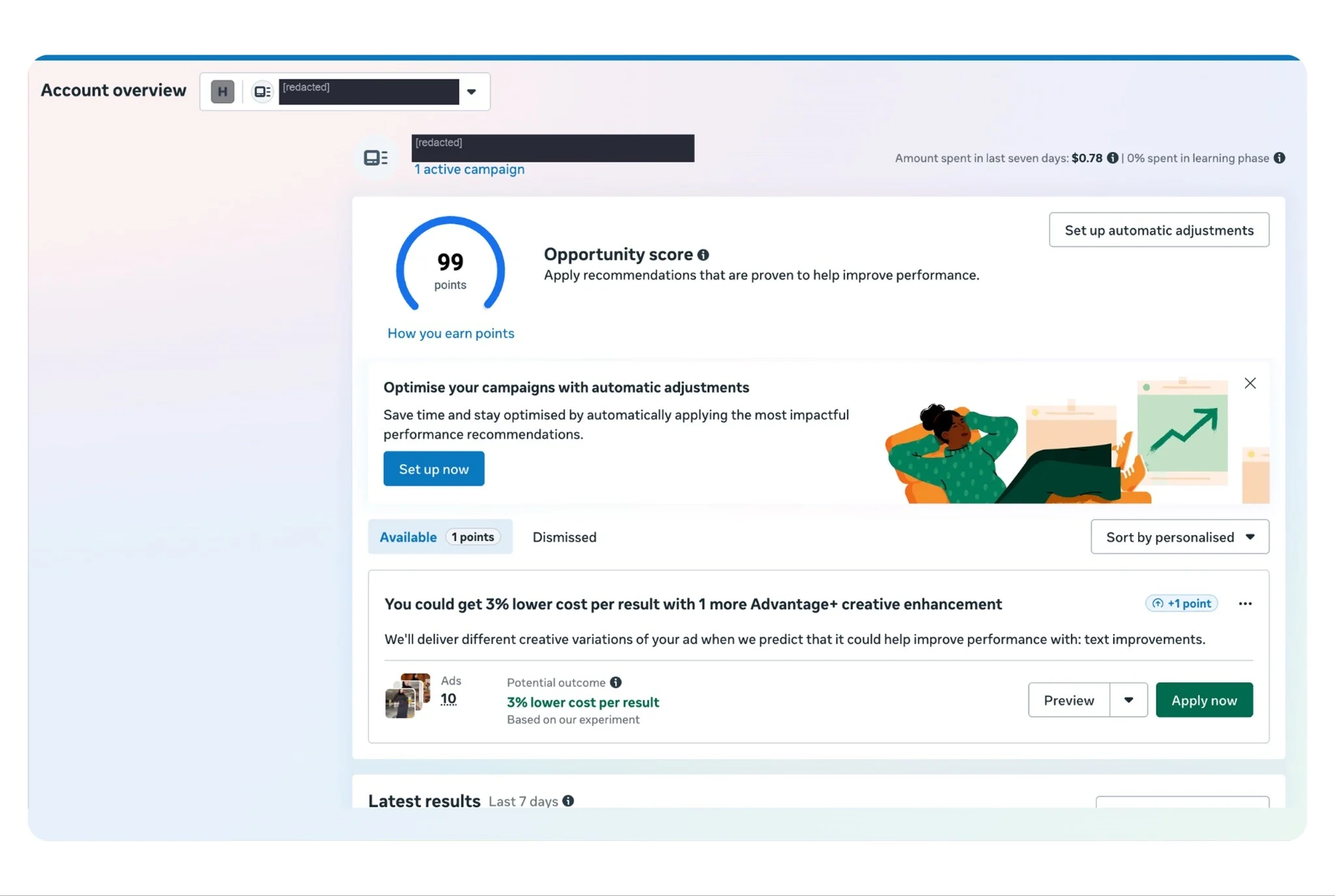
So we decided to delegate the entire setup of the ad account and its launch to Claude Code — an AI agent from Anthropic that writes and runs code on its own. All you need to do is describe the task in words, and the agent writes a program, runs it, finds bugs and fixes itself. Here’s why we needed this:
- Our ad account was rented and completely empty: no campaigns, no pages, no history. We had to build everything from scratch.
- In normal working mode, 10-30 ads run simultaneously, and the fleet needs to be constantly refreshed with new videos. Doing this by clicking through the Facebook interface means spending hours on monotonous work every day.
- Facebook has an API: a way to manage ads with code, without clicking through the interface. One program does in minutes what would take a whole day by hand.
In this funnel, Claude handled a lot of tasks, but one of the most important was independently creating new ad creatives. For Reels, it’s crucial that the creatives be unique, and there’s no way to produce that many videos by hand. The script takes one source video and turns it into dozens of musical variations, and the creatives keep getting refreshed without any new filming. All you need to do is drop all the videos into a folder, and it takes care of the rest.
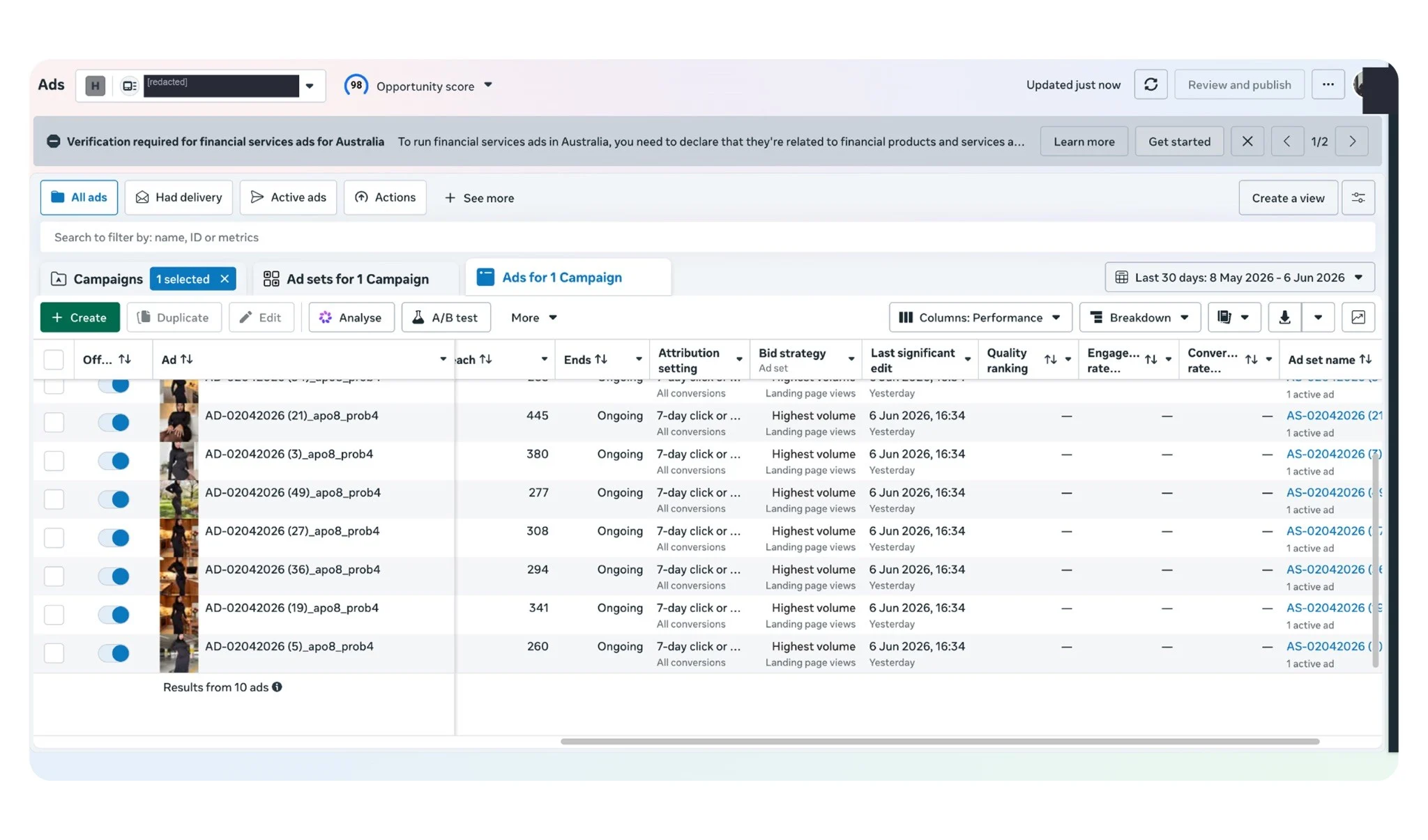
Then Claude uploads the videos to Facebook on its own and assembles the ad campaign, using the formula: 1 video = 1 ad with a $10 daily budget. Tier-1 geos, men aged 18 to 65, placement — Facebook Reels only, automatic audience expansion turned off.
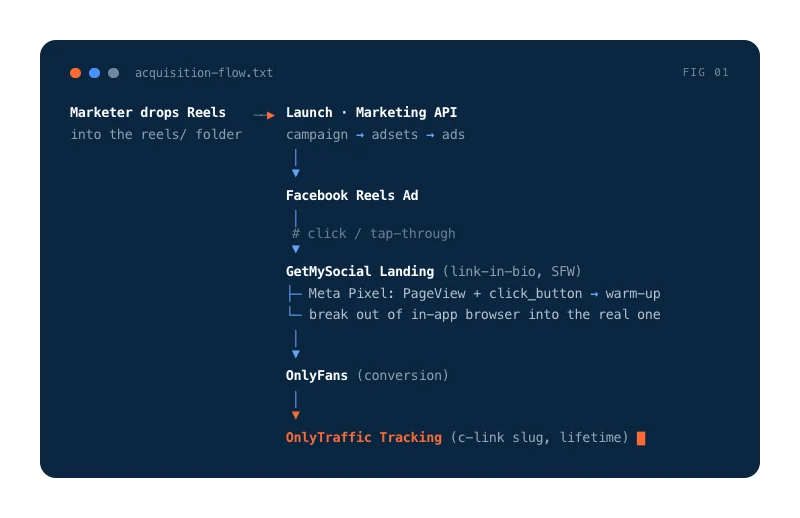
First, the assistant sends one ad for review, and if everything’s fine, the entire batch launches.
What Problems Did Claude Solve During the Work?
Throughout the process of running and launching campaigns, the agent solved a lot of problems:
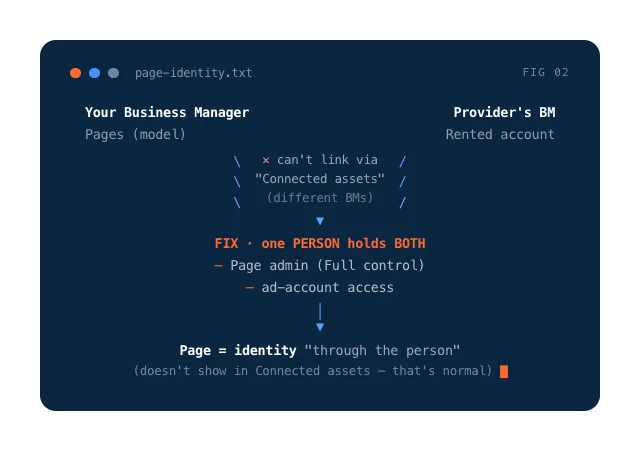
- The page identity wall. Ads need a Facebook Page they’re shown under. Our page lived in one business account, and the rented ad account was in another, and Facebook refused to link them directly. The solution was found through giving one person access rights to both.
- A canary before every launch. The rule: first, one ad, and only after checking that the settings are correct — launch the whole batch. This saves you from the situation of “we launched 10 ads with a mistake and burned 10x the daily budget.”
- The Meta app and access token. Every API call needs an access key. You only need to set up the app and a long-lived token once, and after that, the same access sees all the rented accounts.
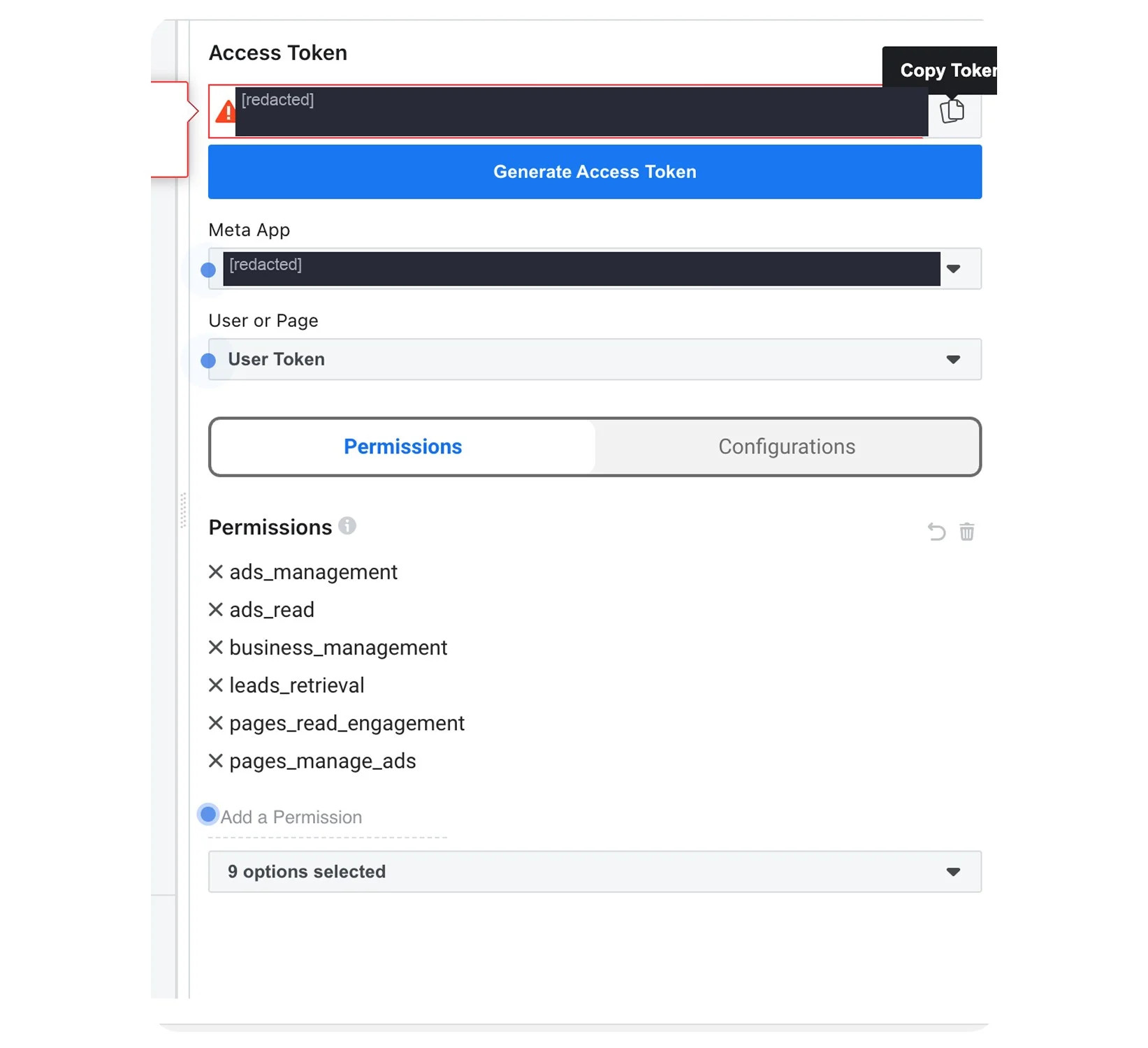
Facebook also kept issuing rejections with confusing errors. The agent read every rejection and fixed it. Here’s a short list of the pitfalls we already ran into:
- Separate ad budgets require a special flag, or the campaign can’t be created;
- A “Stories only” placement isn’t possible, but “Reels only” is;
- The automatic audience flag is mandatory, even if it’s disabled;
- To create the first ad, you need to switch the app to Live mode: you need a Privacy Policy URL — this isn’t a moderation check;
- The maximum audience age is 65, not 75, since 65 means “65+”;
- Video is uploaded through a separate server, not the main one.
In this funnel, AI is just a tool, not the main character — but it was the agent that made scaling possible: without it, one person physically wouldn’t be able to refresh dozens of ad campaigns every day.
The First Test: How We Lost $300 in a Day, and How Not to Do It
Our first run looked successful for exactly one day. Clicks were cheap and kept getting cheaper: starting at $0.18, then dropping to $0.07 per click. Videos were being watched, people were clicking the link, the charts were climbing. By every ad metric, the campaigns looked great. That is, until we checked the tracker where fans are counted. There were 315 clicks and 4 fans, with $287 spent. That worked out to roughly $72 per fan, against a benchmark of $1.71 — 40 times more expensive than the benchmark.
The problem was specifically that we’d initially optimized Facebook Ads for clicking the button on the intermediate page — that very same “Pixel” event. It sounds logical: a button click is closer to a subscription than a plain click. But in reality, Facebook started looking for people who eagerly click buttons, and those turned out to be completely different people from the ones who subscribe and pay.
A cheap click only tells you that the ad grabs attention — it says nothing about subscriptions or money. You can only judge a funnel by the cost per fan and revenue, and those are only visible in the OnlyTraffic tracker. If we’d made our decision based on cost-per-click on day one, we would have considered the funnel a success, even though it was burning money. By the way, a little later, at the same cost-per-click, we almost threw out a funnel that was actually working.
The Second Attempt: 219 Fans at a Dollar Each
After the first test, we changed our approach. The new campaigns were technically optimized for an event that never fired — our “Pixel” simply never saw such actions. Interestingly, this turned out to be the best mode: since Facebook wasn’t getting any signals, it simply showed the videos to a broad, cheap audience, and the videos themselves acted as the filter: whoever watched through and clicked was genuinely interested.
At first glance, this approach looks good, but in practice it only works at small volumes. Getting to 10,000 fans a day would be unrealistic without optimizing for real conversions via the Conversion API. In our case, the “Pixel” was working, but we weren’t optimizing based on it — Facebook barely interacted with it at all, and that’s exactly why we started running the funnel at a profit.
Deep Link and the In-App Browser: 4 Scenarios for Getting the User to OnlyFans
When a person clicks on an ad, Facebook opens the site not in a regular browser, but inside the app — in an in-app browser (webview). Losing the tracking attribute is one of marketers’ biggest problems, since it makes it impossible to “attribute” a fan to a specific ad campaign. Here’s what happens after a user clicks the link:
- The model’s OnlyFans page opens via the link: https://onlyfans.com/[modelname]/c1063 →
- The tracking attribute “c1063” gets saved into the in-app browser’s cookies →
- The page redirects to https://onlyfans.com/[modelname] →
- The fan clicks “open link in default browser” →
- The clean link https://onlyfans.com/[modelname] opens, and the tracking attribute “c1063,” which linked the fan to the specific marketer, is lost forever.
The purpose of deeplinks is to make the OnlyFans page open directly in the default browser. We tested every possible approach to this — draw your own conclusions:
- A pre-lander with a Strict Deeplink — a failure.
The page shows a placeholder screen and asks the user to exit the in-app browser themselves: copy the link and open it in Safari or Chrome. Sounds reliable, but in practice, out of 1,191 visits through the in-app browser, only 24 people made it to OnlyFans. Escape rate — 2%: the placeholder screen killed almost all of the traffic before it ever reached OnlyFans.
- A pre-lander with a regular Deeplink — success.
The button itself tries to push the user out into the external browser, without any manual steps. Result: 71 fans at $1.44, against a benchmark of $1.71. The funnel is profitable.
- A pre-lander with no Deeplink — success, the best result.
The button simply opens OnlyFans, even if it’s still in the same in-app browser. Result: 148 fans at $0.98. Scenarios 2 and 3 ran in parallel as two links, A and B, on identical landing pages, and on the page itself, the deeplink changed nothing: the tap rate was 57-58% in both cases. The entire difference in cost per fan is explained by campaign structure, not the deeplink.
- A direct link to OnlyFans, with no pre-lander — a failure in terms of fans.
The cheapest click across all our tests — $0.07, and 10 times more people made it to OnlyFans than through the pre-lander. But out of 424 clicks, only 1 person subscribed: a cold user who landed directly on OnlyFans didn’t convert. Bonus observation: ads with a direct link to onlyfans.com passed moderation without issue, at least over a short period.
Here’s the result of a clean breakdown, with two traffic streams we call link A and link B:
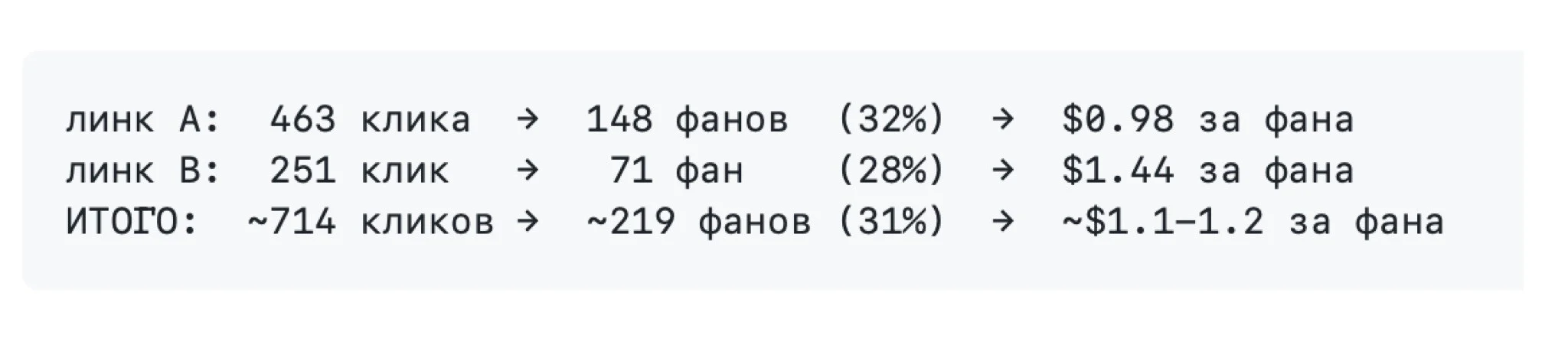
Roughly one in three people who clicked the link subscribed to the model’s page. The cost per fan ranged from $0.98 to $1.44, against a benchmark of $1.71 — the funnel turned a profit. Meanwhile, 17-28% of viewers clicked on the ad videos, and the cost per click ranged from $0.12 to $0.35.
What we learned: it’s important to track cost per fan, not cost per click, and compare it against the benchmark you established before testing began. And second: a pre-lander isn’t the enemy by itself — the enemy is unnecessary manual steps. When a user has to copy and open something themselves, the funnel dies.
Facebook Banned the Account, but the Money Kept Coming In: Funnel Results
On June 10, Facebook disabled our ad account, citing “unusual activity.” For a rented account in a sensitive niche, this is standard: rapid spend growth, dozens of similar campaigns, mass operations via API — we hit every trigger at once.
The ads died instantly: zero new clicks from that day on. Logically, if the ads stopped, the story should be over, but in reality things played out differently. Here’s what happened to the revenue from the fans who came in during that period — those same 295 fans from the two links, including the wasted first run:

Three weeks after the account died, revenue grew from $330 to $510 — an extra $180 with no new spend.
This is the free-sub mechanic at work: fans who subscribed to the page were gradually worked by the chatters and the model, and by this point they’d started buying PPV content — every purchase gets credited to the tracking link the fan originally came from.
And here’s the most interesting part: you can only see this money in a tracker with lifetime attribution. Standard ad reporting only has a window of a few days, and anything the fan pays later simply doesn’t exist as far as it’s concerned. Based on that short window, our funnel looked unprofitable, but on the lifetime picture, it turned a profit: on the dashboard, ROMI for link A showed +52%:
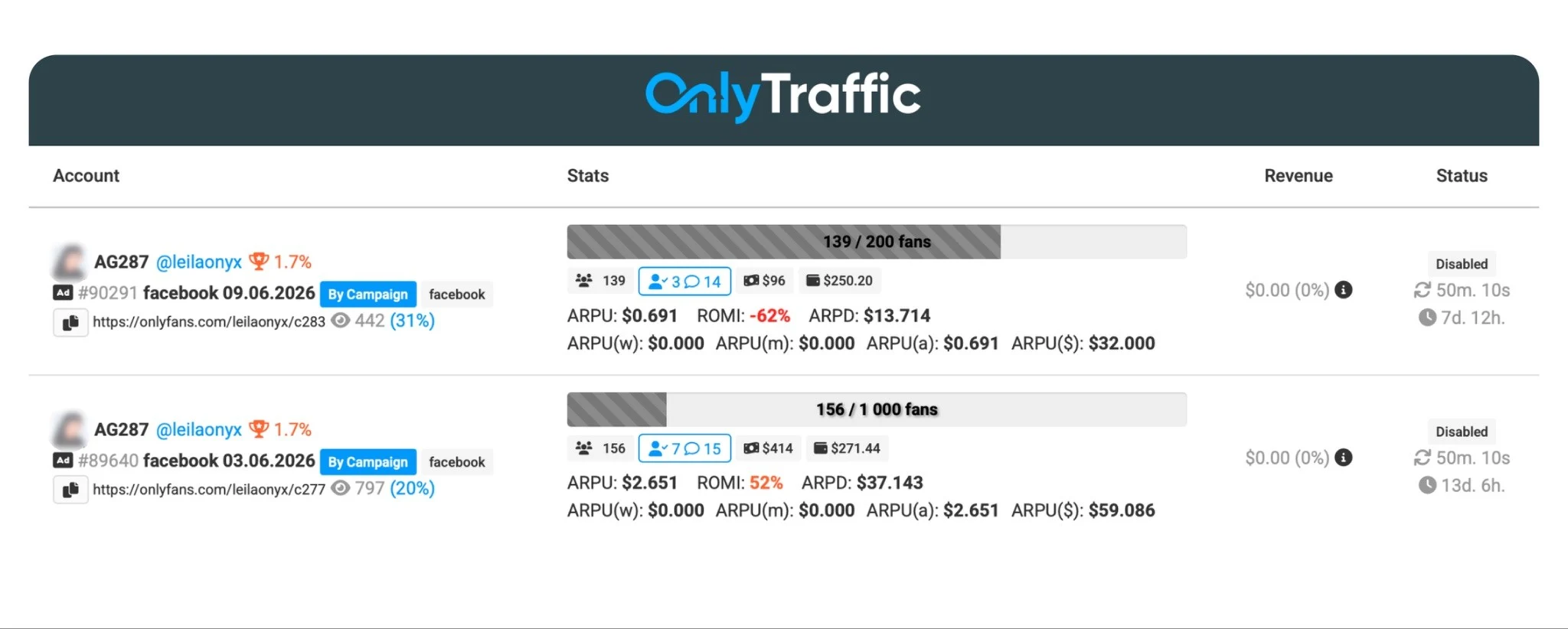
What we learned. In niches with delayed monetization, revenue trickles in over weeks, so if you judge a funnel by its first few days, you might throw away something that’s actually working. A tool that tracks a fan’s revenue over their entire lifetime isn’t just convenient here — it’s a necessity, without which it’s hard to calculate anything in advance.
Results in Numbers, and Useful Tips for Anyone Who Wants to Repeat the Funnel
In total, across both tests, we spent $540 and got 295 fans, of whom 10 made at least one transaction. As of July 2, 2026, we’ve earned $510, and the money keeps trickling in.
Revenue from the second test has almost already covered the $300 we burned. The clean part of the funnel paid for itself roughly twice over. Sure, it’s not the kind of multiples you see in Telegram channels, but it’s a real, working funnel that can be scaled.
If you’ve read this far and are thinking about trying it yourself, here are the main takeaways:
- A cheap click means nothing. The metric that matters: cost per fan versus the specific model’s maximum benchmark.
- You need to know the benchmark before you start — without it, you can’t tell “it’s working” from “it’s not.”
- Don’t make the user manually escape the in-app browser: a deeplink with manual link-copying killed 98% of the traffic. A pre-lander with an automatic deeplink, or none at all, works fine.
- A pixel with no access to real purchases is blind. Only tracking with lifetime attribution counts the money.
- Don’t judge by the first few days: with the free-sub mechanic, revenue takes weeks to come in.
- Hand off the routine launch work to automation, but make decisions based on the numbers in the tracker.
OnlyTraffic provides all the tools you need for this kind of story: a model with ready-made content and a calculated benchmark, a tracking link with lifetime attribution, and payouts based on fan transactions.
In the next article, we’ll cover how we taught Facebook to see real subscriptions and purchases from OnlyFans, and what that did for optimization.








Comments