

![[FBM] CARDS](https://cpa.rip/wp-content/uploads/cr-a1/fbm-cards-v1/fbm-cards-logo.svg)




Let’s break down what a working setup is, which organizational schemes are used in Facebook Ads, and how to reduce the risk of losing access to key assets.
What Is a Working Setup
A working setup in Facebook Ads is a prepared infrastructure for launching ads. It includes ad accounts, Pages, data sources, Business Manager, and Facebook profiles (king accounts) that manage these resources.
A KING account refers to a quality personal Facebook profile used to own and manage ad assets, capable of withstanding the attachment of ad accounts, Business Manager, and Fan Pages.
There are several ways to organize such infrastructure. The choice depends on the team’s tasks, the number of ad accounts, and access distribution requirements.
Ownership and Access
An asset is everything except the king account: ad accounts, Pages, data sources, Business Manager. Owning an asset and having access to it are not the same thing.
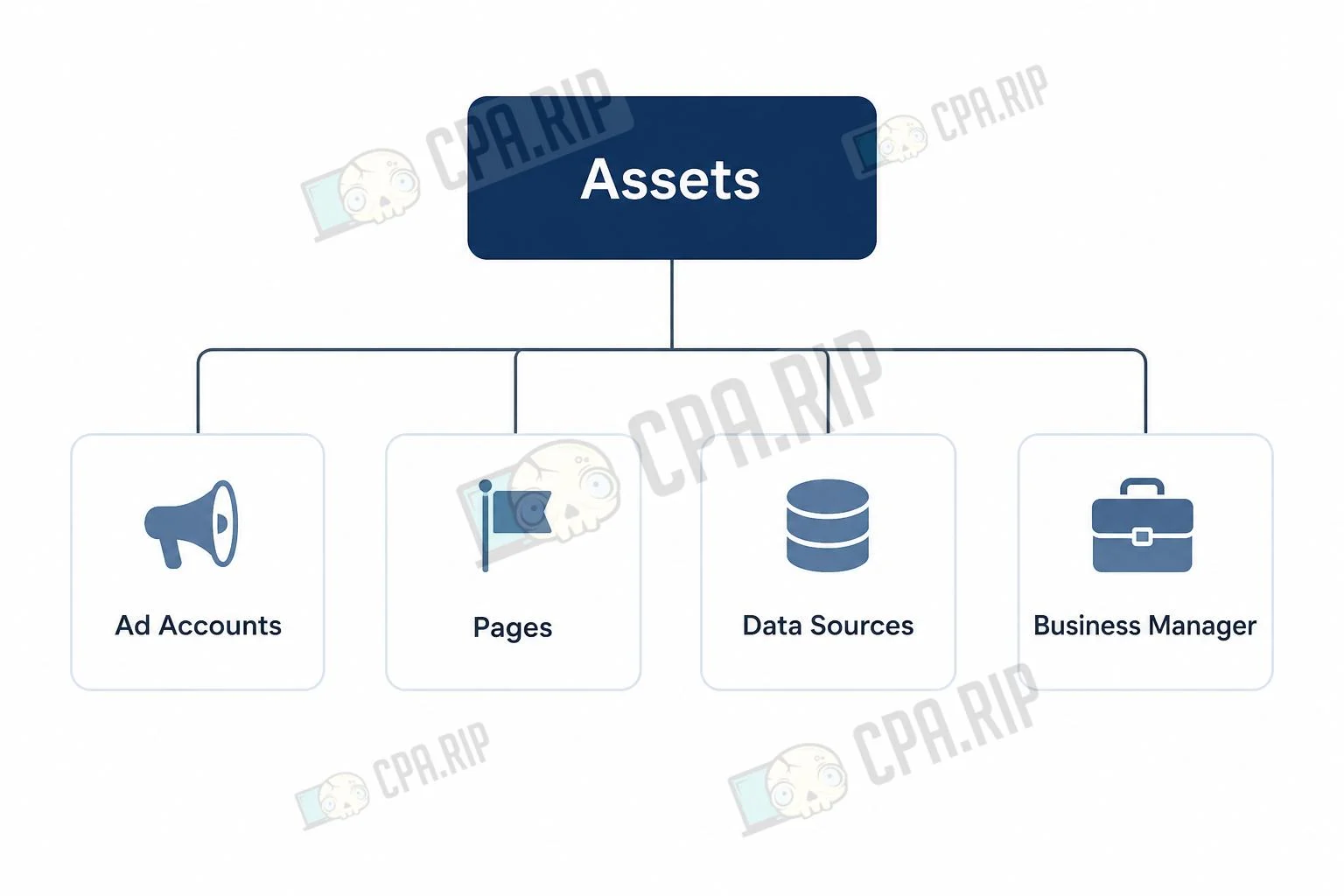
The owner controls the asset and decides who to grant rights to. The owner of an ad account can be a personal account or a Business Manager, depending on how it was created and connected.
An admin can manage the asset within the permissions granted to them.
A partner gets access through their own Business Manager but does not become the owner of the asset.
If an ad account is shared with another BM via Partner Sharing, its owner does not change. That’s why backup access and backup ownership are different tasks.
Main Setup Schemes
Scheme | Ad Account | Page | Dataset or Pixel |
1. Basic | On personal account | On personal account | Linked to the account |
2. BM for Dataset | On personal account | On personal account | In Business Manager |
3. Everything in BM | In Business Manager | In Business Manager | In Business Manager |
4. Split Ownership | In Business Manager | On personal account | In Business Manager |
Scheme 1. Basic
All main assets are located on the personal account: the ad account, Page, and Meta Pixel.
This is the simplest scheme. The main drawback is dependence on the personal account. If the user cannot log into the account or loses admin access, work with the linked assets may stop. To reduce the risk, access to the ad account and Page should be granted to at least one more trusted user in advance.
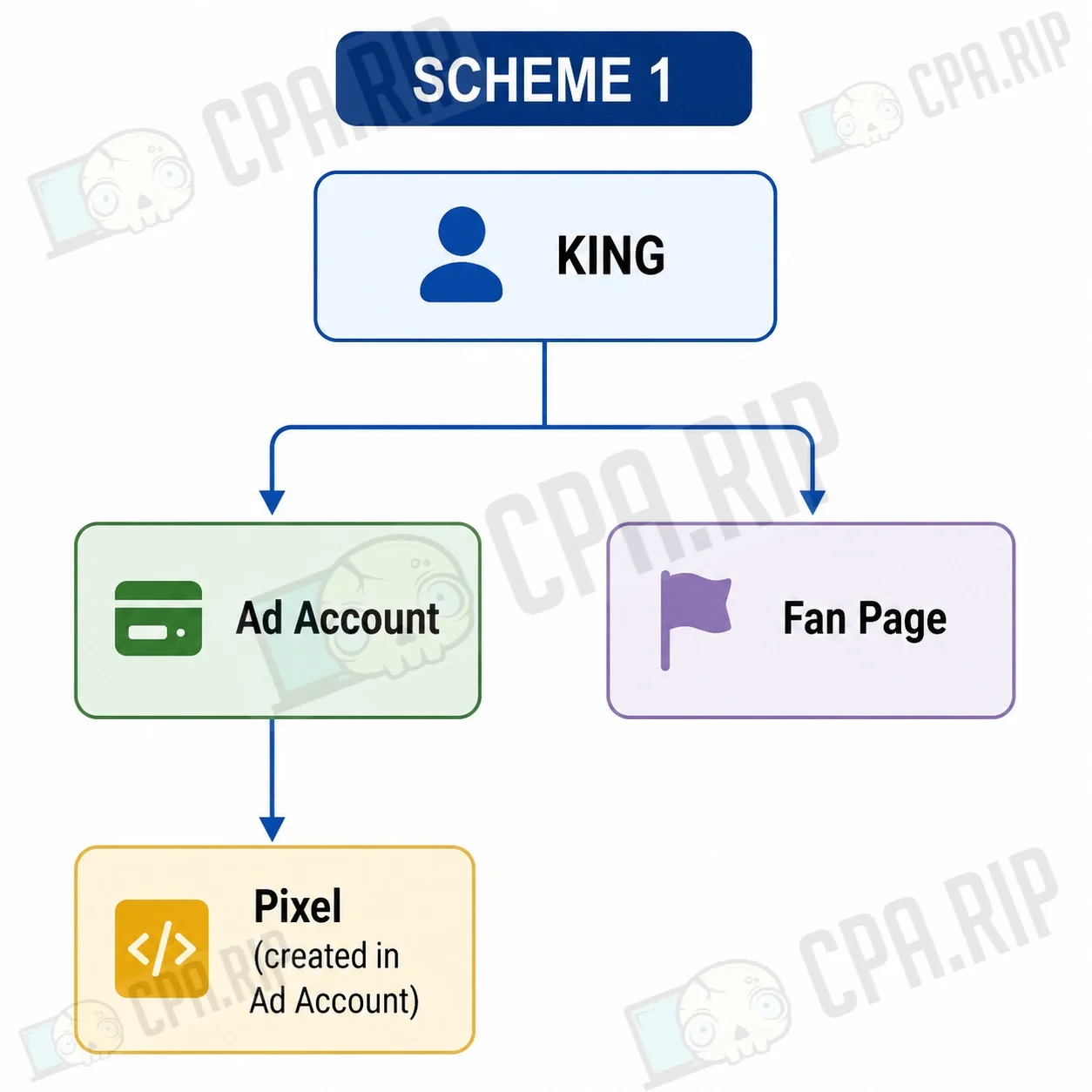
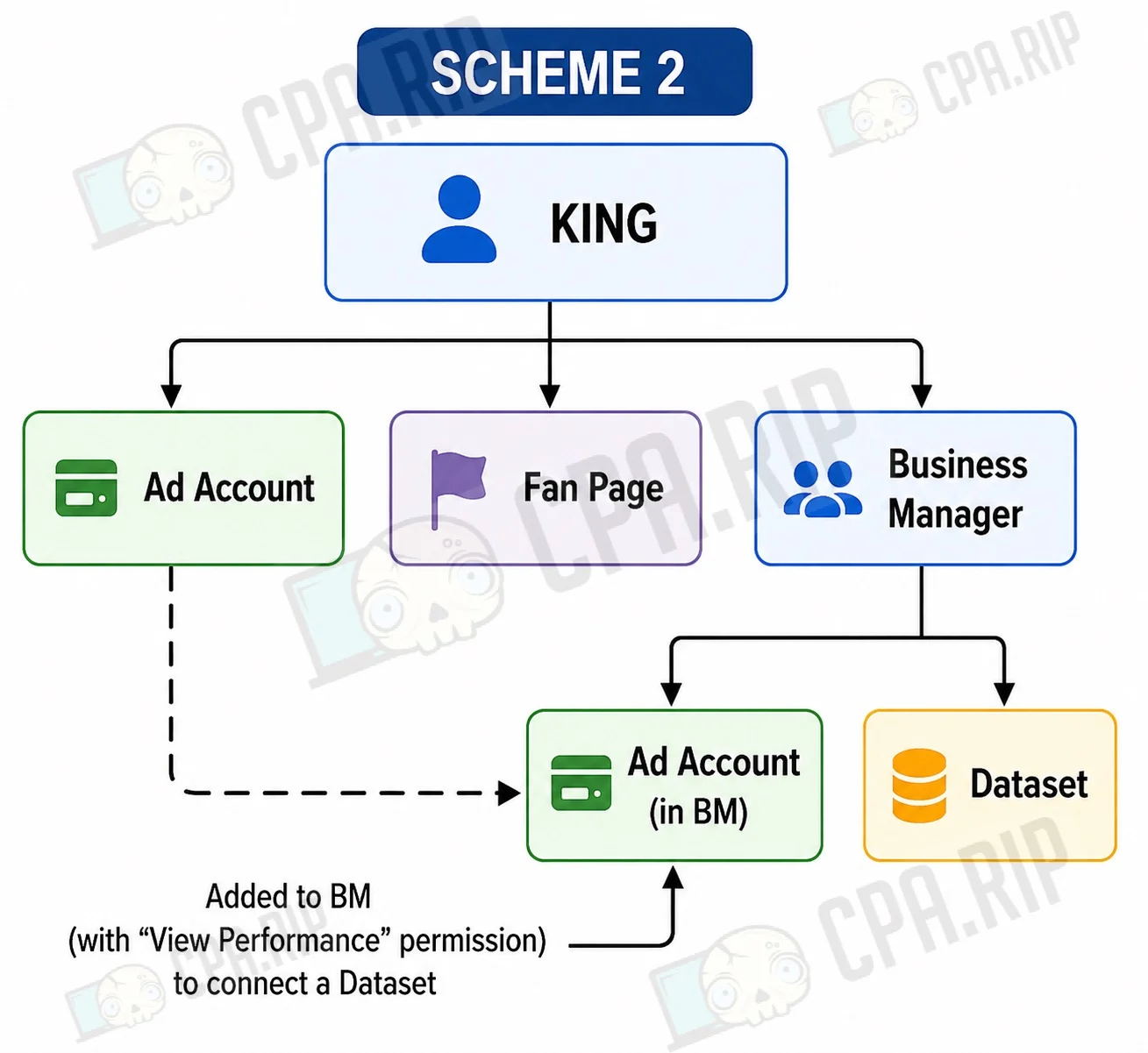
Scheme 2. Separate BM for Dataset
The ad account and Page remain on the personal account, while the Dataset is created in Business Manager. The ad account is granted the necessary access to the Dataset.
This scheme allows for managing and configuring events, but keeps the ad account and Page dependent on the personal account.
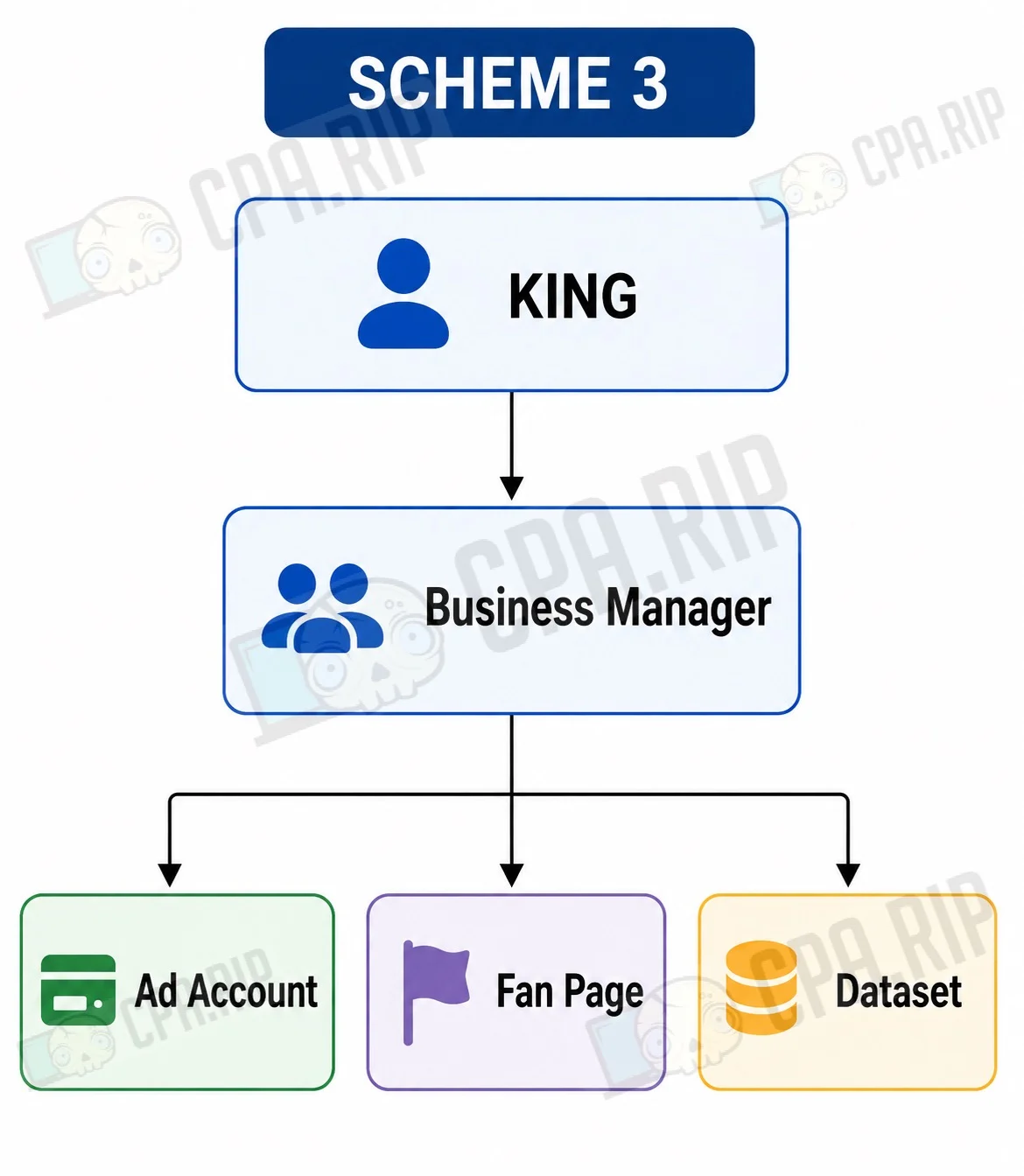
Scheme 3. All Assets in Business Manager
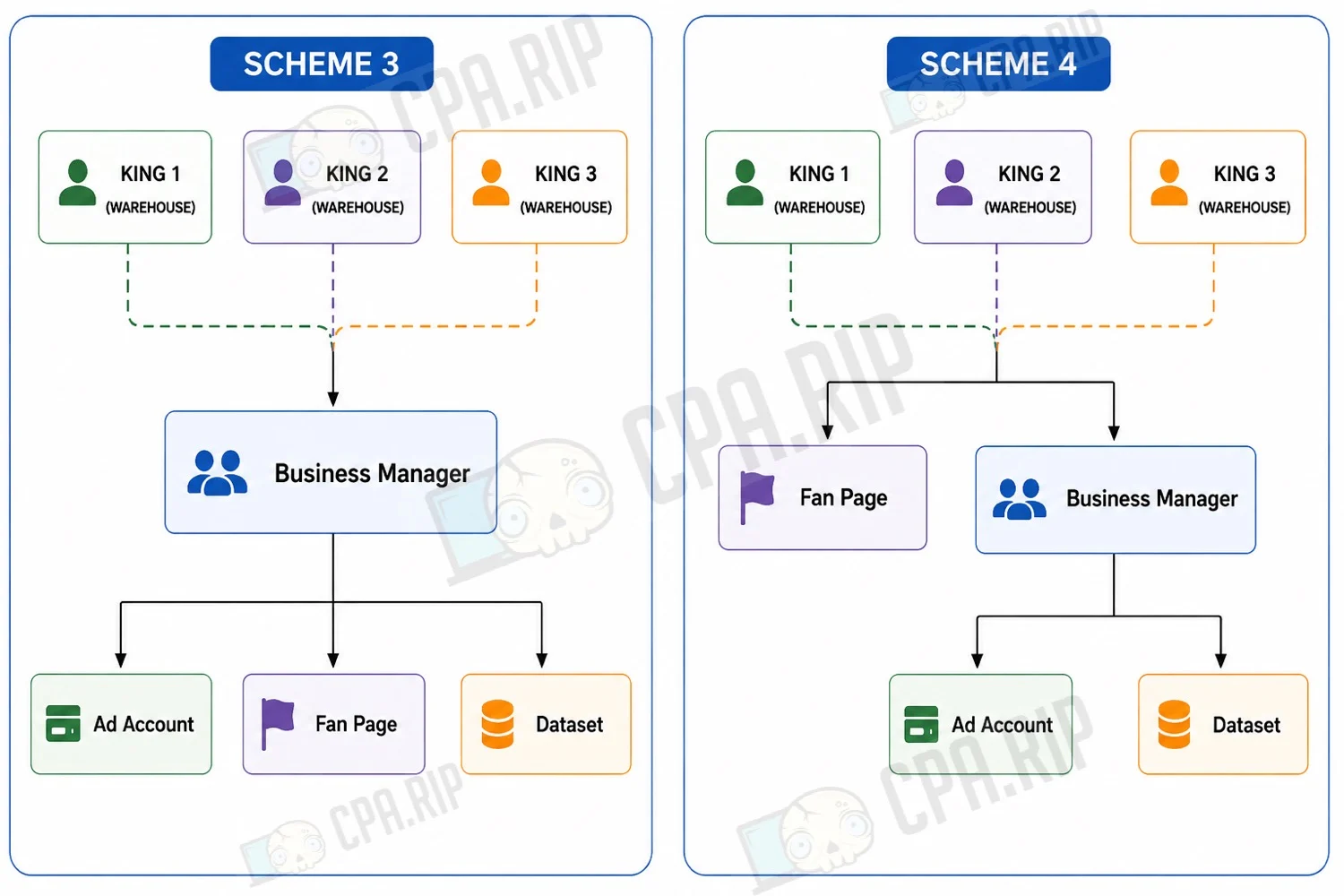
The ad account, Page, and Dataset are all located in Business Manager. Business Manager becomes a single management hub, and users are granted rights according to their tasks.
- assets are gathered in a single workspace;
- user rights can be managed separately;
- it’s easier to onboard employees and partners;
- daily operations don’t depend on a single user when there are multiple admins;
The drawback is asset concentration. If Business Manager gets restricted or loses all admins, the problem can affect the entire infrastructure at once.
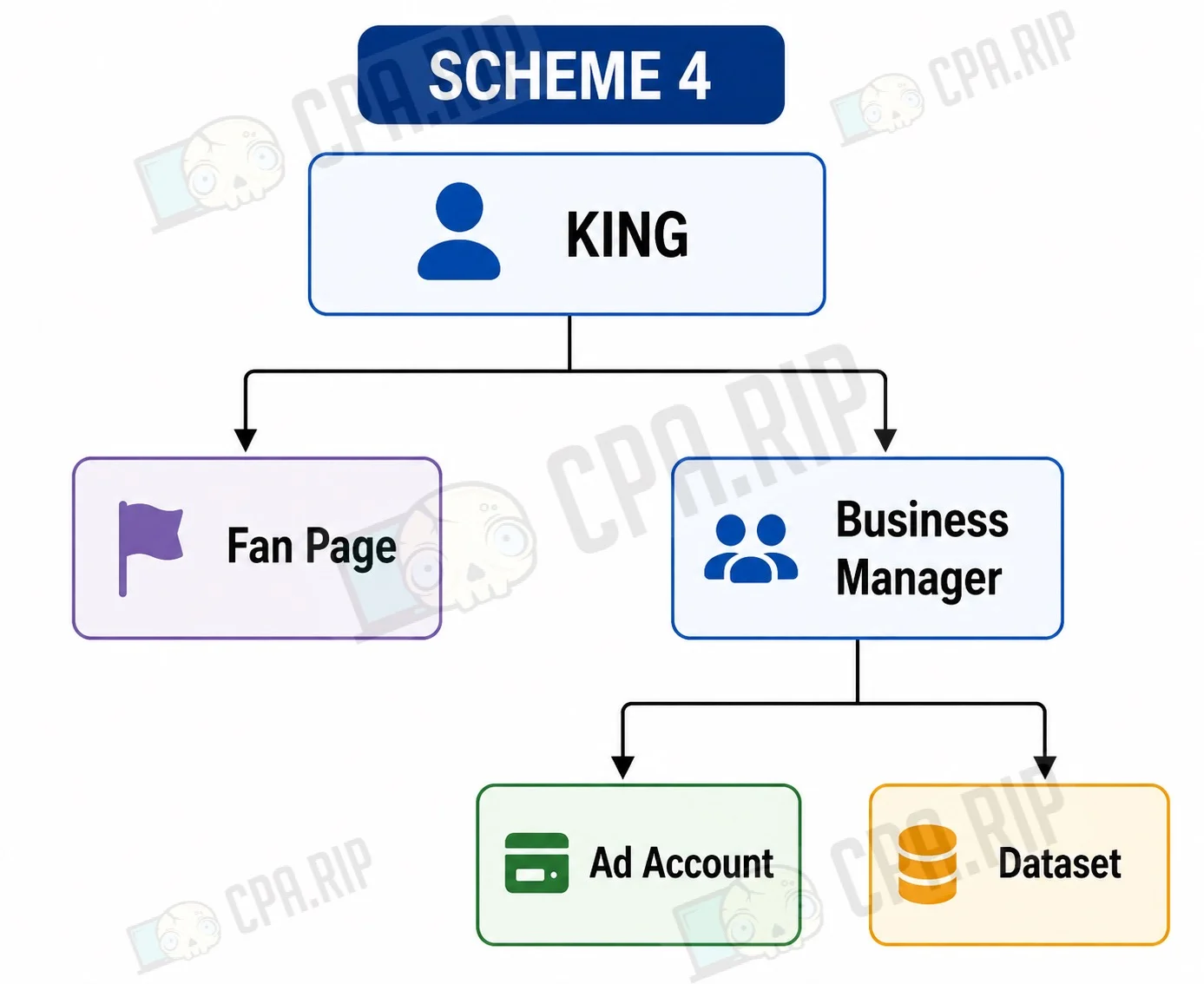
Scheme 4. Page Stays on Personal Account
Business Manager owns the ad account and Dataset, while the Page remains on the personal account.
With this setup, access to the Page, admin access to Business Manager, and rights to the ad account and Dataset need to be backed up separately. Due to the split ownership, this scheme is more complex to maintain.
What Is Setup Backup and a “Warehouse”
Backing up access to the setup, or a “save,” is a pre-arranged system of owners and admins that helps prevent loss of access to working assets in the event of a ban, review, or unavailability of one of the accounts.
Access can be lost, for example, in the following situations:
- the King account receives an identity verification request;
- the Business Manager that owns the ad account and Fan Page gets banned;
- the sole admin of Business Manager loses access to their account.
The save method depends on where the main assets are located:
- directly on the King account, as in Schemes 1 and 2;
- inside Business Manager, as in Schemes 3 and 4.
A “warehouse” is a King account or Business Manager used to store ad assets and backup access, which typically does not participate in day-to-day ad operations.
All Main Assets Are on the King
If the ad account and Page are located directly on the personal account, backup is done by adding a second user as an admin of the ad account and Page. This way, if needed, the backup user can manage the assets and continue working with them.
For this architecture, it’s recommended to use three King accounts:
- First and second King — warehouse accounts that store the ad accounts and Fan Page.
- Working King — the account from which all daily work is carried out.
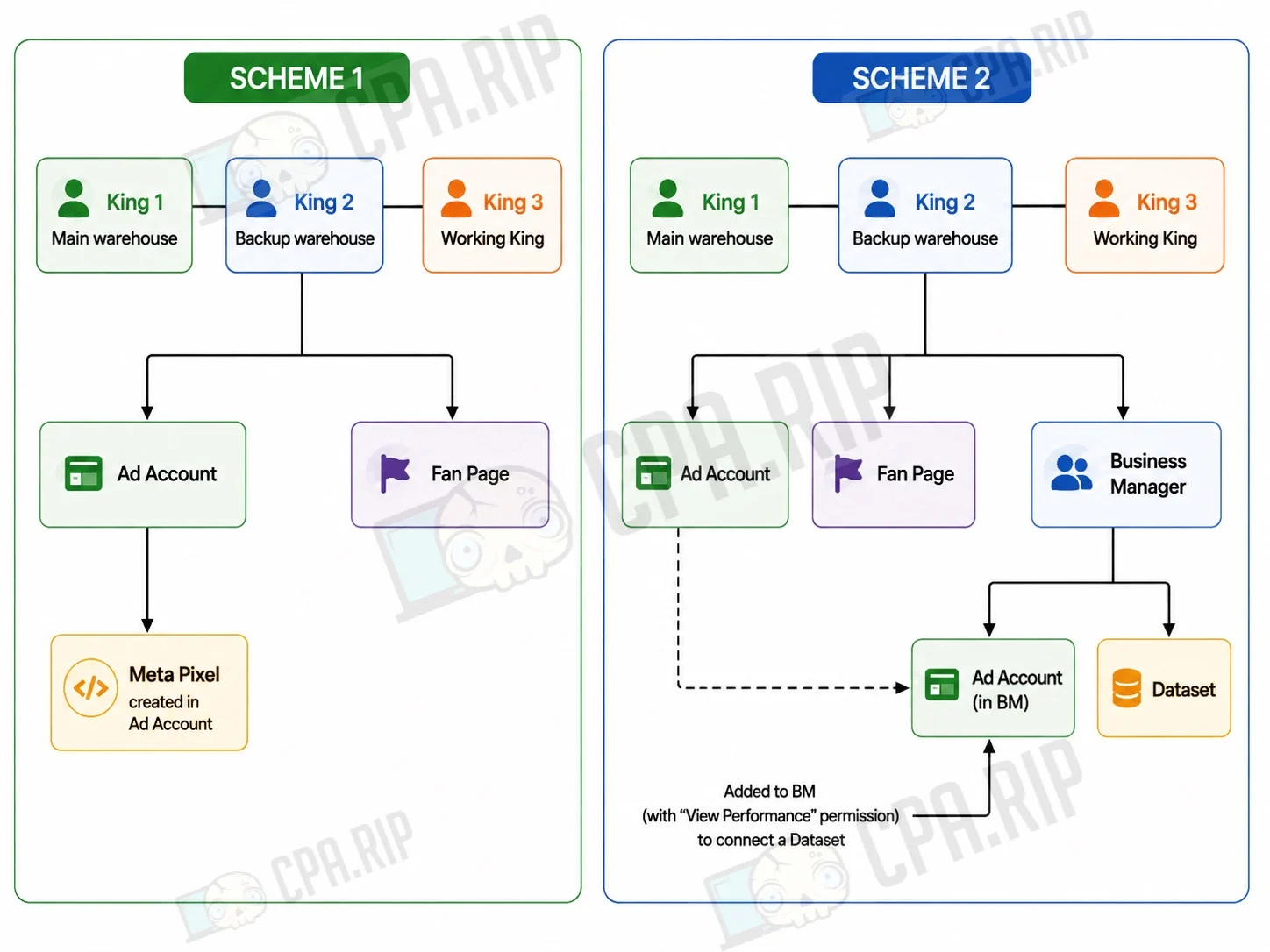
If necessary (for example, in case of a selfie verification request), any King is replaced with a new one, after which work with the ad accounts continues until they are fully banned. After the ad accounts are permanently lost, previously used King accounts can be reused.
Restricted accounts that don’t affect asset storage can be used as warehouse King accounts. For example, accounts with the error: “Advertisers in Russia currently cannot create or run ads.”
One downside: no more than two ad accounts can be stored on a single King account.
You can read about how to transfer a Facebook ad account to a KING in this article: https://cpa.rip/facebook/facebook-ads-methods/#Kak_peredat_reklamnyj_kabinet_Facebook_na_KING
Ad Accounts on Business Manager
If an ad account belongs to Business Manager, it can be protected in two ways:
- preserve the Business Manager itself;
- additionally share the ad account via Partner Sharing to another Business Manager.
If, however, the ad account does not belong to Business Manager but was received via Partner Sharing, backup is only possible at the level of the Business Manager that was granted access.
Where the ad account was created | Which backup methods are available |
Account belongs to your BM | 1. Business Manager backup. 2. Distributing accounts via Partner Sharing. |
Account received via Partner Sharing | Only Business Manager backup. |
Business Manager Backup
The main task is preserving Business Manager itself. In practice, it’s recommended to use three warehouses, not counting the working King.
Having multiple admins is important because in some cases Meta requires confirmation of a new user’s invitation by an existing Business Manager member. If BM is left with only one admin, restoring access may become impossible.
It’s advisable to store no more than 3-4 BMs with 10 ad accounts on each warehouse.
The working King can be connected in two ways. First, add it as a 4th admin with basic rights but full access to the accounts. Second, share the needed accounts via partnership to the working King’s BM.
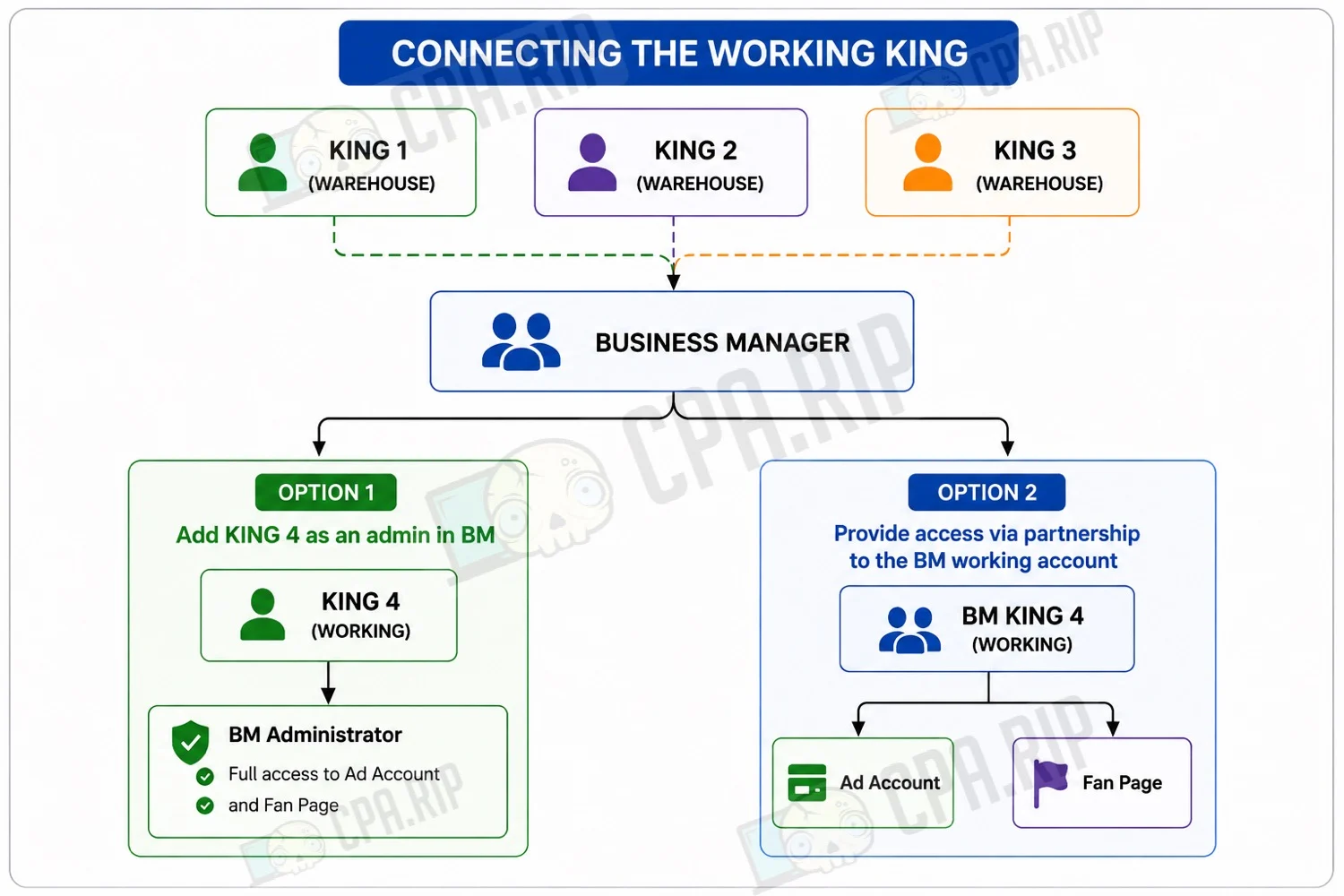
If the ad accounts are connected to a Dataset on the warehouse BM, there’s no need to transfer it. In the case of partnership, the Dataset can be created on the working BM.
Backing Up Ad Accounts via Partner Sharing
This method does not replace Business Manager backup, but complements it.
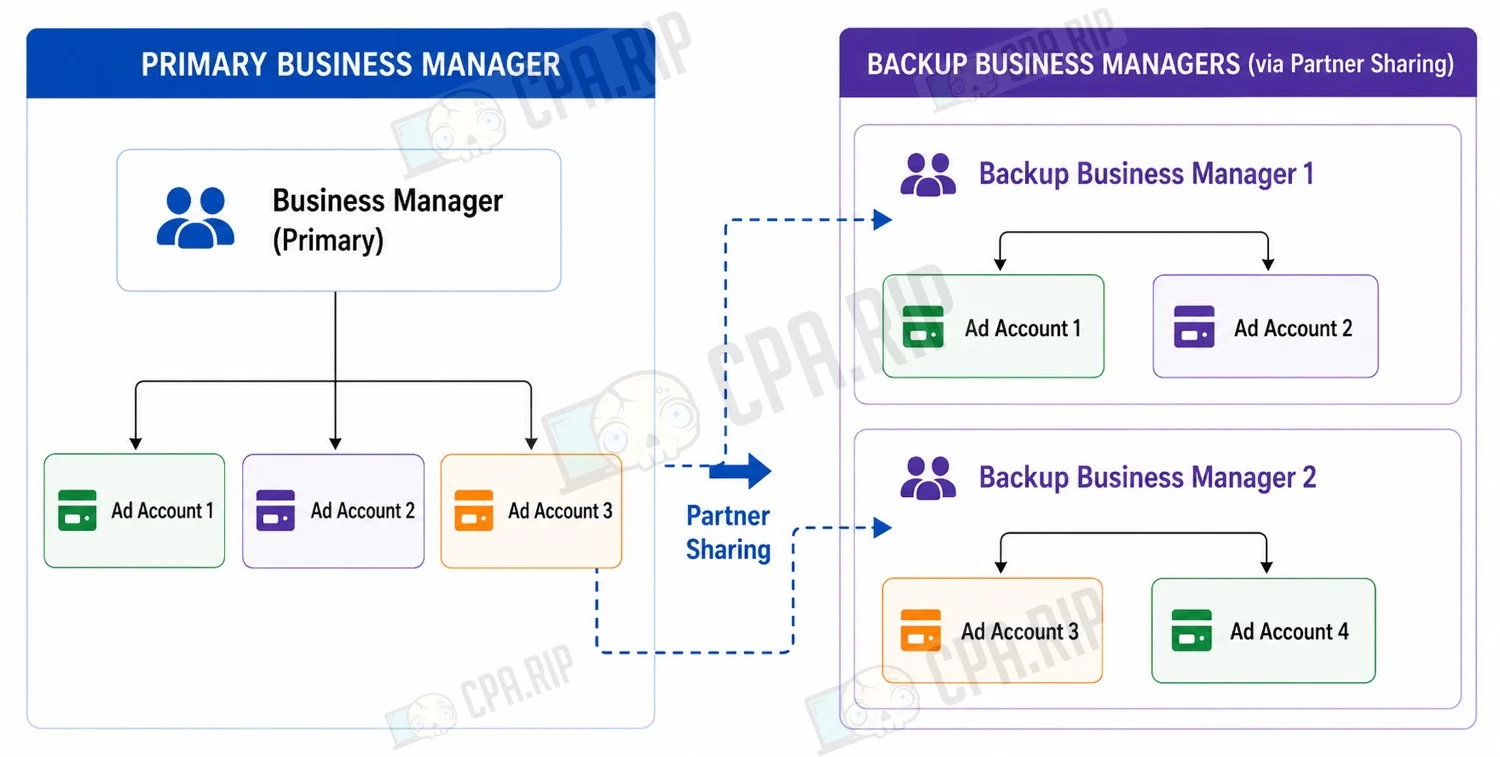
The main Business Manager owns all the ad accounts, but each account is additionally shared via Partner Sharing with backup Business Managers.
Recommendations:
- don’t store more than 2 ad accounts in a single backup BM;
- use several backup Business Managers.
In this case, even if the main BM is completely lost, the ad accounts will still be accessible through the backup Business Managers.
One of the backup BMs is shared with the working King for launching traffic.
Warehouse for Cloud Services
For services like FBTool, Dolphin Cloud, and similar solutions, it’s better to use a separate warehouse.
2-3 Business Managers are added to a single king, each containing up to 10 ad accounts with “View Performance” rights. This king is used only for connecting services and does not participate in daily work
Additional Isolation
To increase reliability, a few more rules can be followed:
- at least one of the warehouses should operate in a different antidetect browser;
- it’s advisable to purchase consumables for at least one warehouse (accounts, proxies, numbers, etc.) from a different seller;.
Infrastructure Record-Keeping
It’s recommended to maintain an internal registry that records the name and ID of Business Manager, the IDs of ad accounts, Pages, Datasets, and Pixels, owners, admins, partner access, connected services, and the date of the last check.








Comments